A computer case is a crucial part of a desktop computer that houses all the internal components, such as the motherboard, CPU, RAM, hard drives, power supply, and other peripherals. Typically, computer cases have been designed in a vertical orientation with the motherboard placed vertically, but there is an increasing trend of designing computer cases horizontally. In this write-up, we will discuss the pros and cons of using a horizontal computer case.
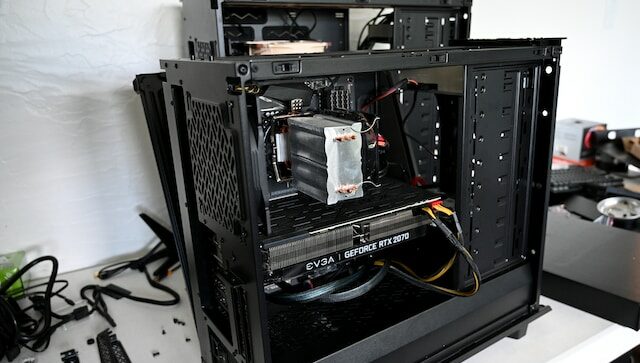
Upsides of a Horizontal Computer Case
Compact Design One of the most significant benefits of a horizontal computer case is its space-saving design. Unlike vertical computer cases that consume more vertical space, horizontal cases have a lower profile and can fit under a desk or table. This is especially advantageous for people with limited desk space or prefer a tidy work area.
Enhanced Cooling Horizontal computer cases provide better cooling than vertical cases. In a vertical case, hot air rises, and the generated heat from internal components accumulates at the top of the case, causing inadequate ventilation. In contrast, in a horizontal case, the heat is evenly distributed, keeping the internal components cool. This leads to better performance and a prolonged lifespan for the components.
Improved Accessibility Horizontal computer cases provide improved access to the internal components. The motherboard and other components are mounted horizontally, making it easier to access and remove them for upgrades or repairs. This can be especially helpful for users who frequently upgrade or replace components in their computers.
Unique Design Horizontal computer cases offer a unique aesthetic appeal that differentiates them from traditional vertical issues. They have a sleek and modern design that can complement any workspace or home décor.
Downsides of a Horizontal Computer Case
Compatibility Issues One of the primary disadvantages of horizontal computer cases is that they may not be compatible with all components. Some CPU coolers, for example, may be too tall to fit inside a horizontal case. Additionally, some graphics cards may not fit in a horizontal case, depending on their length and height.
Limited Expansion Horizontal computer cases may have limited expansion capabilities compared to vertical cases. They have less vertical space, which can restrict the size of components that can be added. For users planning to add multiple hard drives, for instance, a horizontal case may not be the best choice.
Reduced Airflow Although horizontal cases offer better cooling than vertical cases, they may have reduced airflow in some cases. This can be due to the fact that horizontal cases often have fewer fans than vertical cases. Choosing a horizontal case with adequate airflow is crucial to ensure that the internal components stay cool.
Conclusion
Horizontal computer cases provide several advantages over traditional vertical cases, such as compact design, enhanced cooling, improved accessibility, and a unique design. However, they also have some downsides, such as compatibility issues, limited expansion, and reduced airflow in some cases. Ultimately, the choice of whether to use a horizontal or vertical computer case depends on the user’s specific needs and preferences. When selecting a horizontal case, it’s crucial to consider the compatibility of components, the case’s expansion capabilities, and the airflow to ensure optimal performance and cooling.