A phone’s charging port is an essential component that allows you to charge your device and transfer data. However, over time, dust, lint, and other debris can accumulate in the port, causing charging issues, and even damage the port if not cleaned properly. In this article, we’ll go through a step-by-step guide on how to clean your phone’s charging port.
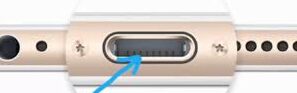
- Power off your phone: Before you start cleaning your phone’s charging port, it’s important to turn off your device. This ensures that you don’t damage any of the sensitive components in the port while cleaning.
- Examine the charging port: With the phone turned off, take a close look at the charging port. Look for any visible debris, dust, or lint that may be blocking the port.
- Use a soft-bristled brush: Using a soft-bristled brush, gently sweep the charging port to remove any visible debris. Be careful not to damage the port’s pins or cause any other damage to the port’s internal components.
- Compressed air: If you have access to compressed air, use it to blow out any remaining debris. Hold the can upright and a few inches away from the port. Use short bursts of air to avoid overblowing and causing any damage.
- Toothpick or plastic pick: For stubborn debris that is difficult to remove, you can use a toothpick or a plastic pick to gently scrape away the debris. Again, be careful not to damage the port’s pins.
- Isopropyl alcohol: If you notice any sticky residue in the charging port, you can use isopropyl alcohol to clean it. Dip a cotton swab or a soft-bristled brush in the alcohol and gently clean the port. Be sure to avoid getting any alcohol on your phone’s screen or other sensitive components.
- Let the charging port dry: After cleaning the port with isopropyl alcohol, give it some time to dry completely before plugging in your phone. This ensures that there is no moisture left in the port that could cause damage to your phone’s electronics.
- Check the charging port: Once the charging port is dry, inspect it again to ensure that all debris and residue are removed. If there are still any debris or residue, repeat the cleaning process until the port is clean.
In summary, cleaning your phone’s charging port is a simple process that requires only a few basic tools. By following the above steps, you can ensure that your charging port stays clean and free from any debris that may cause issues with charging or data transfer. Remember to be gentle when cleaning the port and avoid using any sharp or abrasive tools that could damage the sensitive components of your phone.