Blocking someone on your phone can be a helpful feature, but sometimes you may need to unblock someone for various reasons. Whether it’s because you accidentally blocked someone or you’ve resolved the issue that led you to block them in the first place, unblocking someone on your phone is a straightforward process. In this article, we will guide you through the steps to unblock someone on your phone, including both Android and iOS devices.
Unblocking Someone on an Android Phone
If you’re using an Android phone, here’s how you can unblock someone:
- Open the Phone App: Go to your phone app on your Android device. You can also access your phone app by swiping up on your home screen.
- Access Settings: Tap the three-dot icon in the top right corner of your screen and select “Settings” from the drop-down menu.
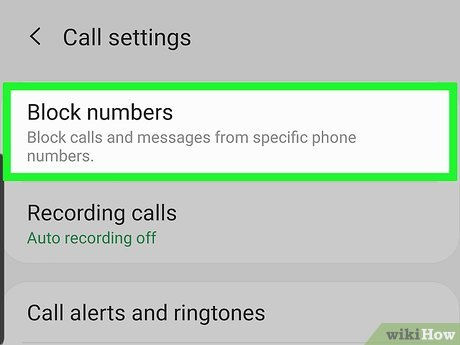
- Find the Blocked Numbers Section: Look for the “Blocked numbers” option in the settings menu and tap on it. This will open a list of all the numbers that you have blocked on your Android phone.
- Unblock the Number: Find the number that you want to unblock and tap on it. Then tap on the “Unblock” option to unblock the number. You will be prompted to confirm your decision to unblock the number.
- Confirm Your Decision: Tap “Unblock” once again to confirm your decision to unblock the number. Once you do this, the number will be removed from your blocked list, and you will be able to receive calls and messages from that number again.
Unblocking Someone on an iPhone
If you’re using an iPhone, the steps to unblock someone are slightly different. Here’s how you can unblock someone on your iPhone:
- Open Settings: Go to your iPhone’s home screen and tap on the “Settings” app.
- Find the Phone Section: Scroll down to the “Phone” section and tap on it.
- Find the Blocked Contacts Section: Look for the “Blocked Contacts” option and tap on it. This will open a list of all the contacts that you have blocked on your iPhone.
- Unblock the Contact: Find the contact that you want to unblock and swipe left on their name. Then tap on the “Unblock” option to unblock the contact.
- Confirm Your Decision: Tap “Unblock” once again to confirm your decision to unblock the contact. Once you do this, the contact will be removed from your blocked list, and you will be able to receive calls and messages from that contact again.
Conclusion
Unblocking someone on your phone is a simple process, whether you’re using an Android or an iPhone device. Once you unblock someone, you’ll be able to receive calls and messages from them again. However, it’s important to remember that unblocking someone doesn’t mean that you’ve resolved the issue that led you to block them in the first place. If you’ve blocked someone due to harassment, bullying, or any other form of abuse, it’s essential to take steps to protect yourself and stay safe. You can also consider seeking professional help or support from a trusted friend or family member.