Opening an external hard drive can mean a few different things, depending on what you’re trying to do. Here are a few scenarios and some guidance on how to proceed:
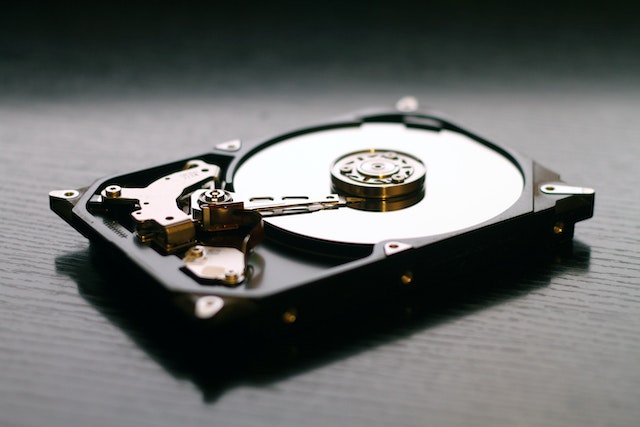
- You want to physically open the external hard drive enclosure to access the hard drive itself: If you want to access the hard drive inside the enclosure, you will need to disassemble the enclosure. This is usually a fairly simple process, but it will vary depending on the enclosure design. In general, you will need a screwdriver, and you will need to remove any screws or clips that are holding the enclosure together. Once you have opened the enclosure, you should be able to access the hard drive. However, it’s important to note that opening the enclosure will likely void any warranty on the drive.
- You want to access the files stored on the external hard drive: If you just want to access the files on the external hard drive, you don’t need to physically open the enclosure. Instead, you can connect the drive to a computer and access the files through the operating system. This is usually done by plugging in the drive via USB or another connector, and then opening the file explorer or finder to browse the contents of the drive. If the drive is not recognized by the computer, you may need to install drivers or troubleshoot the connection.
- You want to repair or recover data from a malfunctioning external hard drive: If your external hard drive is not functioning properly, you may need to repair or recover data from it. This can be a more complicated process that may require specialized tools and expertise. In general, it’s a good idea to start by running diagnostic tests on the drive to identify the problem. From there, you may be able to repair the drive or recover data using data recovery software or professional services. It’s important to note that attempting to repair or recover data from a malfunctioning drive can be risky, and may further damage the drive or result in data loss.
- You want to encrypt or password protect the external hard drive: If you want to add encryption or password protection to your external hard drive, you can do so using software tools. Many external hard drives come with built-in encryption and password protection features, but if your drive doesn’t have these features, you can use third-party software. Some popular options include VeraCrypt and BitLocker (for Windows), and FileVault (for Mac). Keep in mind that encrypting or password protecting your drive will add an additional layer of security, but may also make it more difficult to recover data if you forget your password or lose the encryption key.
- You want to format the external hard drive: If you want to format your external hard drive, you can do so using your computer’s operating system. Formatting will erase all data on the drive, so be sure to back up any important files before proceeding. In general, you can format the drive by opening the file explorer or finder, right-clicking on the drive, and selecting “Format.” From there, you can choose the file system and other formatting options. It’s important to note that formatting will permanently erase all data on the drive, so be sure to double-check that you’ve backed up any important files before proceeding.
In conclusion, opening an external hard drive can mean different things depending on what you’re trying to do. Whether you want to physically access the drive, recover data, encrypt the drive, or format the drive, there are steps you can take to achieve your goals. However, it’s important to proceed with caution, as any changes you make to the drive can have consequences for your data and your warranty.
Open external hard drive